Getting started
LokalBoards is an open-source (MIT) Kanban board you run on your own server. Boards, areas, cards, checklists, comments and files — all of it in your own database, with nothing phoning home and no third-party service in the path.
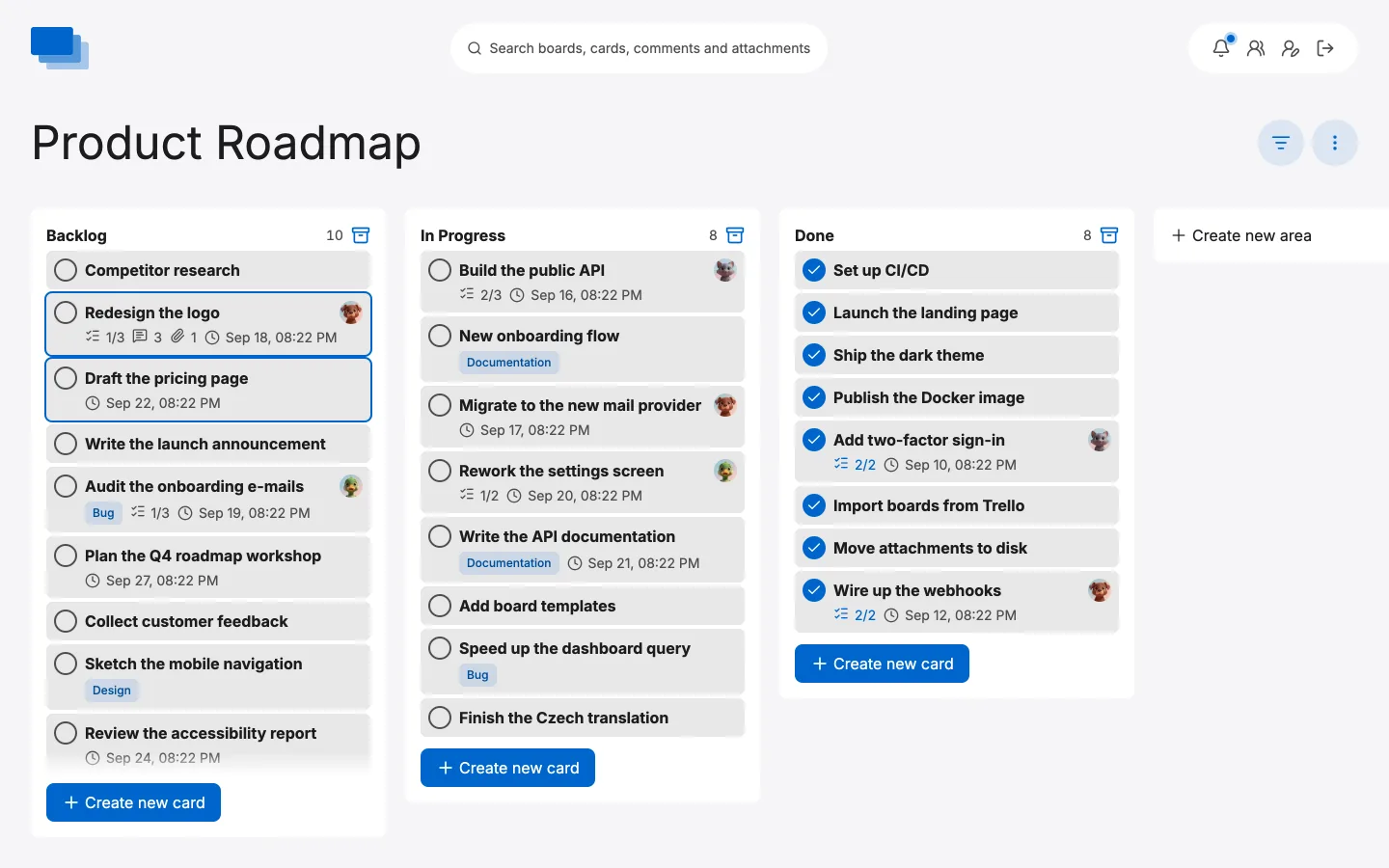
Boards are live for everyone on them: a card someone moves, a comment someone writes and a box someone ticks all appear immediately for anybody else looking, over an internal Socket.IO connection. It also ships an MCP server, so an assistant can work a board through an API key you issue or a connection you approve, and can revoke either.
The interface is available in ten languages: English, German, French, Spanish,
Italian, Dutch, Polish, Ukrainian, Portuguese and Czech. Pick one with
NUXT_LANGUAGE.
The quickest start
The published image carries its own MySQL, so one command gives you a working instance with nothing else to install:
docker run -d \
  --name lokalboards \
  -p 3000:3000 \
  -v lokalboards_uploads:/app/public/uploads \
  -v lokalboards_database:/var/lib/mysql \
  -e NUXT_ADMIN_EMAIL=you@example.com \
  -e NUXT_ADMIN_PASSWORD=a-long-password \
  florianstrasser/lokalboards:latest
Open http://localhost:3000 and sign in with the address and password you just
set. Both volumes matter: the first keeps your attachments across updates, the
second keeps the database.
The database password is generated on first start and kept beside the data it protects, so no default is shared between instances and there is nothing to choose. MySQL listens on the container's loopback interface only; port 3306 is never published.
Running your own database
For anything long-lived a separate database is the better arrangement — it can
be backed up, upgraded and monitored on its own schedule. Set NUXT_MYSQL_HOST
and the built-in one never starts:
docker run -d \
  --name lokalboards \
  -p 3000:3000 \
  -v lokalboards_uploads:/app/public/uploads \
  -e NUXT_MYSQL_HOST=db.internal \
  -e NUXT_MYSQL_USER=lokalboards \
  -e NUXT_MYSQL_PASSWORD=... \
  -e NUXT_MYSQL_DATABASE=lokalboards \
  florianstrasser/lokalboards:latest
An empty database is enough — the tables are created on first start, and every later start applies whatever schema changes are outstanding.
One thing to check if it applies to you:
NUXT_MYSQL_HOSTset tolocalhost,127.0.0.1or::1selects the built-in database. An instance running withnetwork_mode: hostthat means the MySQL on the host would quietly use the container's own instead. Any other hostname, including a Compose service name, is unaffected.
Docker Compose
Two files ship with the repository:
docker-compose.yml
for the bundled database, and
docker-compose.external-db.yml
for the app and MySQL side by side.
docker compose up -d
Configuration
Configuration is read from environment variables at runtime, so nothing ever
has to be rebuilt to change a setting. Pass them as real environment variables
(--env-file, Compose environment:, your host panel) or mount a .env at
/app/.env. Real environment variables win over the file.
# App
NUXT_APP_NAME=LokalBoards
NUXT_BOARDS_URL=https://boards.example.com
NUXT_LANGUAGE=en
NUXT_PUBLIC_PRIVACY_URL=https://www.example.com/privacy-policy/
NUXT_PUBLIC_SIGNUP=false

# The first administrator, created at startup when the instance has none.
NUXT_ADMIN_EMAIL=you@example.com
NUXT_ADMIN_PASSWORD=a-long-password

# Database — omit these entirely to use the one inside the image
NUXT_MYSQL_HOST=db.internal
NUXT_MYSQL_USER=lokalboards
NUXT_MYSQL_PASSWORD=...
NUXT_MYSQL_DATABASE=lokalboards
# true if your database requires TLS (common for managed MySQL). Set
# NUXT_MYSQL_SSL_REJECT_UNAUTHORIZED=false if its certificate cannot be
# verified against a public CA.
NUXT_MYSQL_SSL=false

# E-mail, for invitations, password resets and the hourly digest
NUXT_EMAIL_HOST=mail.example.com
NUXT_EMAIL_PORT=465
NUXT_EMAIL_SECURE=true
NUXT_EMAIL_USER=contact@example.com
NUXT_EMAIL_PASS=...

# Optional: lets an import of a private Trello board bring its files along
# (see "Bringing boards over" in the boards guide)
NUXT_PUBLIC_TRELLO_API_KEY=
The colours are configurable too — see Adjust Colors.
Running from source
If you would rather not use Docker, LokalBoards is an ordinary Nuxt application. It needs Node 22 and a reachable MySQL 8+.
git clone https://github.com/florian-strasser/LokalBoards
cd LokalBoards
npm install
npx nuxt build
The build lands in .output. Copy that to wherever you run Node, put your
environment variables in place, and start it:
node ./server/index.mjs
Nix and NixOS
The repository is a flake, so a machine with Nix needs nothing else installed — no Node, no npm, no clone:
nix run github:florian-strasser/LokalBoards
That starts the server. It still needs a MySQL 8 to talk to and the usual environment variables, exactly as running from source does; the flake packages the application, not a database.
Uploaded files are resolved relative to the working directory, and the Nix store
is read-only, so run it from somewhere writable — the process creates
public/uploads under wherever it starts.
As a NixOS service
The flake also exposes a NixOS module, which puts the application behind a
systemd unit with a hardened sandbox, points its working directory at
/var/lib/lokalboards so uploads have somewhere to live, and brings up a local
MySQL:
{
  inputs.lokalboards.url = "github:florian-strasser/LokalBoards";

  outputs = { nixpkgs, lokalboards, ... }: {
    nixosConfigurations.myhost = nixpkgs.lib.nixosSystem {
      system = "x86_64-linux";
      modules = [
        lokalboards.nixosModules.default
        {
          services.lokalboards = {
            enable = true;
            port = 3000;
            environmentFile = "/run/secrets/lokalboards.env";
            settings.NUXT_APP_NAME = "Acme Boards";
          };
        }
      ];
    };
  };
}
environmentFile is required and is where secrets belong — NUXT_MYSQL_PASSWORD
first of all, plus any SSO client secret. Anything set through settings is
written into the Nix store instead, which is world-readable.
One thing the module deliberately does not do is create the database user.
NixOS creates database users that authenticate through the unix socket with no
password, while this application connects over TCP with one, so an
automatically-created user could never log in. Create it once, with the same
password environmentFile carries. services.mysql.initialScript runs a SQL
file when MySQL starts for the first time:
services.mysql.initialScript = "/run/secrets/lokalboards-init.sql";
CREATE USER 'lokalboards'@'localhost' IDENTIFIED BY 'the-password';
GRANT ALL PRIVILEGES ON lokalboards.* TO 'lokalboards'@'localhost';
The file holds the password, so keep it out of the Nix store like the
environment file, and readable by the mysql user — MySQL reads it, not root.
It only runs while MySQL sets up its data directory; on a machine where MySQL
has started before, run the two statements once with sudo mysql instead.
Behind a reverse proxy
The service listens on 127.0.0.1. Put a reverse proxy that terminates TLS in
front of it rather than moving it to a public interface. With nginx:
{
  services.lokalboards.settings.NUXT_BOARDS_URL = "https://boards.example.com";

  services.nginx = {
    enable = true;
    # Among other headers, tells the app that the browser used HTTPS.
    recommendedProxySettings = true;
    recommendedTlsSettings = true;
    # Attachments can be up to 50 MB; nginx turns away any request over 1 MB
    # unless told otherwise.
    clientMaxBodySize = "50m";
    virtualHosts."boards.example.com" = {
      forceSSL = true;
      enableACME = true;
      locations."/" = {
        proxyPass = "http://127.0.0.1:3000";
        # Boards update live over a websocket.
        proxyWebsockets = true;
      };
    };
  };

  security.acme = {
    acceptTerms = true;
    defaults.email = "you@example.com";
  };

  networking.firewall.allowedTCPPorts = [ 80 443 ];
}
NUXT_BOARDS_URL is the address people reach the instance at: links in emails
and single sign-on are built from it. When it starts with https://, or the
proxy sends X-Forwarded-Proto: https as recommendedProxySettings does, the
session cookie is marked Secure. Over plain HTTP it is not, so an instance on a
trusted network works without TLS too.
What has been tested
The package is built on every release: from the lockfile, without network access, and then started against a MySQL 8 to run its migrations and serve the sign-in page.
The module is booted on every change too. The flake carries a NixOS test that
sets up a machine the way this page describes, reached through nginx over plain
HTTP, and puts it through what you would try yourself: MySQL comes up with the
database created, the user from initialScript logs in over TCP, the
migrations run, the first administrator from NUXT_ADMIN_EMAIL signs in with a
cookie that fits the connection, websockets for the live updates get through the
proxy, uploads land in the state directory, and all of it is still there after a
reboot. CI runs it on x86_64-linux; on a NixOS or Nix machine of your own:
nix build github:florian-strasser/LokalBoards#checks.x86_64-linux.nixos-module
Not covered: certificates from ACME, and single sign-on. Reports are very welcome on the issue tracker.
Building the image yourself
The build toolchain runs on your machine's architecture while the finished image
may target another, so use docker buildx and name the platform of the server
you are deploying to — otherwise the container fails to start with an
Exec format error:
# one-time: a builder that can do cross-platform builds
docker buildx create --use --name multiarch

# build for the server's architecture and push
docker buildx build --platform linux/amd64 -t <your-registry>/lokalboards:latest --push .
The build stage is pinned to your machine's native architecture, so the heavy part runs natively rather than under emulation, while the runtime image targets the platform you asked for.
Next
- Boards — creating one, sharing it, and what the options do
- Users — the first administrator, and inviting everyone else
- Health Check — the endpoint to point a monitor at